
TL; DR
A sales deck is a presentation used to explain your product. Your Service. Or your solution to potential buyers. It is usually one of the most important tools in the sales process.
Having said that, this blog explains why traditional sales decks lose attention. How to create a sales deck your buyers will use. How an Interactive Presentation can turn sales content into a more engaging, personalized, and useful experience.
Your Sales Deck Might Be Working Against You
Sales decks are supposed to make buying decisions easier.
They help sales teams explain the product, pitch the value, show proof, and guide the next step. At least, that is the idea.
But in reality, most decks do not get much time to make an impression. According to Salesforce, you have about 30 seconds to hook your audience with your sales deck.
So, if your deck is too long. Or too generic. Or too difficult to follow; your buyers may lose interest before the value is even clear.
And that matters.
Before we get into the fix, let’s look at what this blog covers:
- TL; DR
- Your Sales Deck Might Be Working Against You
- What Is a Sales Deck?
- Why Traditional Sales Decks Lose Buyer Attention
- The Real Cost of a Weak Sales Deck
- What a Good Sales Deck Should Actually Do
- How to Create a Sales Deck That Buyers Actually Use
- Why Interactive Presentations Fix the Sales Deck Problem
- How Dot.vu Helps Turn Sales Decks Into Interactive Presentations
- Your Sales Deck Should Help Buyers Move Forward
What Is a Sales Deck?
A sales deck is the story your sales team uses to frame the buyer’s problem. Show your solution. And make the case for why it matters.
It usually supports sales calls. Product demos. Pitches. Follow-ups. Investor meetings. Or internal buying discussions.
Why Traditional Sales Decks Lose Buyer Attention
Traditional decks often lose attention because they are built around the seller’s talking points, not the buyer’s decision process.
They move in a straight line. Problem. Solution. Features. Proof. Pricing and the next step.
That structure can work on a live pitch. However, it becomes limited when your buyers want to explore what matters to them. One buyer may care about ROI. Another may want use cases. Another may need technical details before anything else.
The problem is that everyone gets the same deck.
Many sales presentations also try to explain too much at once. Too much text. Some, too many product details. Too many slides that feel important to the seller. However, not always useful to the buyer.
And with a static sales deck, you do not always know what landed.
A view or download tells you someone opened it. It does not tell you what they cared about. What they skipped. Or where they lost interest.
This means, it makes it harder to follow up with the right message.
The Real Cost of a Weak Sales Deck
A weak sales deck does not always lose the deal immediately.
Sometimes, it just makes the next step harder.
Your buyers may lose interest before the value is clear. Sales reps may spend too much time explaining basic points instead of qualifying needs. Follow-ups can become generic because there are no clear engagement signals to work with.
It gets even harder when the deck is shared internally.
The original conversation gets removed. A stakeholder opens the sales presentation later with no context. Skims a few slides. And misses the most relevant point and moves on.
Not exactly ideal.
For complex products or services, this can slow everything down. The offer feels harder to understand. The value feels less obvious. And the buyer has to do more work to connect the dots.
That can affect pipeline quality, conversion rates, and deal velocity.
What a Good Sales Deck Should Actually Do
A good sales deck is not just a visual aid.
It is a decision-support tool.
It should help your buyers understand the problem. See why it matters. And connect your solution to their situation. It should make the value proposition clear. Show relevant use cases. And explain product fit without making buyers work too hard.
It also needs proof.
That could mean:
- Case studies
- Customer results
- Testimonials
- Product examples
- Clear metrics that help buyers trust what you are saying.
Most importantly, a strong sales deck should guide the next step.
That is the real difference between a deck that looks good and a deck that actually helps move the conversation forward.
How to Create a Sales Deck That Buyers Actually Use
The goal is not to add more slides.
It is to make the deck easier to follow. Easier to navigate and more relevant to the buyer.
Start With the Buyer’s Problem
Before talking about features, start with what the buyer is trying to solve.
- What is costing them time, money, efficiency, or growth?
- What problem are they already aware of?
- What issue are they still trying to define?
When the deck starts with the buyer’s world, the rest of the story becomes easier to follow.
Keep the Story Clear
A strong sales deck should have a simple flow.
Problem. Impact. Solution. Proof. Next step.
That does not mean the deck has to be boring. It just means buyers should not have to work hard to understand the point.
If every slide introduces a new idea, the story starts to blur.
Make It Easy to Navigate
Not every buyer will read your sales deck from slide one to the end.
Moreover, some will jump straight to pricing. Others will look for use cases. Proof. Integrations. Or implementation details.
Clear sections help buyers find what matters to them quickly. This is especially useful when the deck is shared with other stakeholders after the call.
Show Value, Not Just Features
Features explain what your product does.
Value explains why anyone should care.
Instead of listing every capability, connect your features to outcomes. Show how they help buyers:
- Save time
- Reduce cost
- Improve performance
- Support teams
- Make better decisions.
That is what makes the sales presentation feel useful.
Include Proof
Buyers need reasons to believe you. In fact, use:
- Case studies
- Metrics
- Customer logos and testimonial
- Product screenshots
- Real examples to support your claims.
Proof helps reduce doubt and makes the deck feel less like a pitch.
End With a Clear Next Step
End with a clear action. Book a demo. Start a trial. Review a proposal. Speak with the team. Share requirements.
Whatever the next step is, make it obvious.
Why Interactive Presentations Fix the Sales Deck Problem
An Interactive Presentation changes the role of your sales deck.
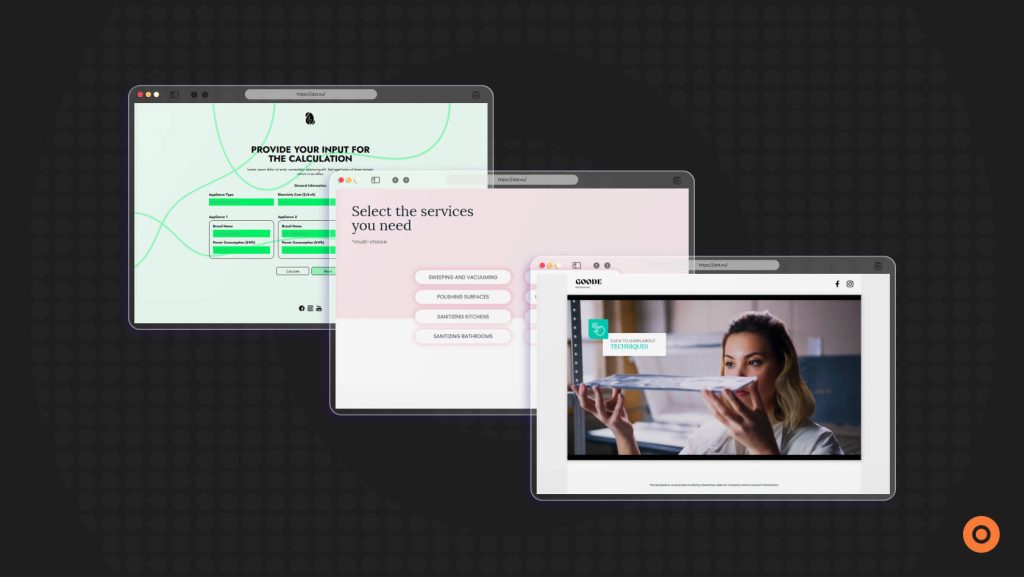
Instead of taking buyers through one fixed slide sequence, it lets them move through the content based on what they care about. They can explore use cases. Watch videos. Compare options. Use calculators. Complete forms. Or follow clickable paths that match their needs.
In fact, that makes the sales presentation feel less like a pitch and more like a useful buying tool.
It also helps sales teams have better conversations. Reps can move through the presentation based on the buyer’s questions. Instead of jumping around a static deck or forcing every prospect through the same flow.
The bigger shift is this: your deck becomes Interactive Content.
Buyers are no longer just watching or downloading it. They are interacting with it. And when they interact, you get clearer signals about what matters to them. What they skip. And where they may need more support.
That makes follow-up more relevant and less generic.
Once your sales deck becomes something buyers can interact with, the next question is how to build that experience without starting from scratch.
How Dot.vu Helps Turn Sales Decks Into Interactive Presentations
Dot.vu helps teams turn static sales decks into Interactive Presentations that support sales. Onboarding. Product demos. Training and more.
You can build:
- Clickable paths
- Product tours
- embedded videos
- ROI calculators
- Quizzes
- Lead forms
- Guided selling flow
- Gamified elements
- Other interactive content blocks.
This allows each buyer to move through the presentation in a way that matches their interest. Role Or stage in the buying process.
For example, your buyer can calculate potential ROI. Explore a live product demo. Compare solution paths. Or jump into a guided selling flow without leaving the presentation.
Dot.vu also gives your team built-in engagement analytics, so you can track how users interact. Where do they drop off. More importantly, what drives conversions.
With lead capture, gated progression, and integrations with CRM, CMS, and marketing tools, the data can flow back into the systems your team already uses.
And if you need to move quickly, Dot.vu’s AI Interactive Builder can generate structured Interactive Presentations and interactive components from a prompt. This gives you a strong starting point without rebuilding from scratch.
Your Sales Deck Should Help Buyers Move Forward
A sales deck should not just present information. It should help your buyers understand, compare, and decide.
Static decks still have a role, especially for simple pitches and internal sharing. But when your buyers need a more relevant, flexible, and useful experience, linear slides can only do so much.
Interactive Presentations make sales content easier to explore and easier to act on. They help your buyers focus on what matters to them. This gives your team clearer engagement signals for better follow-up.
Ready to turn your sales deck into an Interactive Presentation? Start your 14-day free trial with Dot.vu and build sales content buyers can actually explore.